Prodsys

Based on SWTDO
26.0. 0 .0

bilibli

				
					https://www.bilibili.com/video/BV1ByJ6zVESm


					https://www.bilibili.com/video/BV1mR4y1z7Gy


					https://www.bilibili.com/video/BV1d4zRYnEyu/


					https://www.bilibili.com/video/BV1eN411C7Pb


					https://v.douyin.com/i5YvtRjb/


					https://www.bilibili.com/video/BV1GVfFY3EYB


					https://v.douyin.com/i5Y3p4xq/


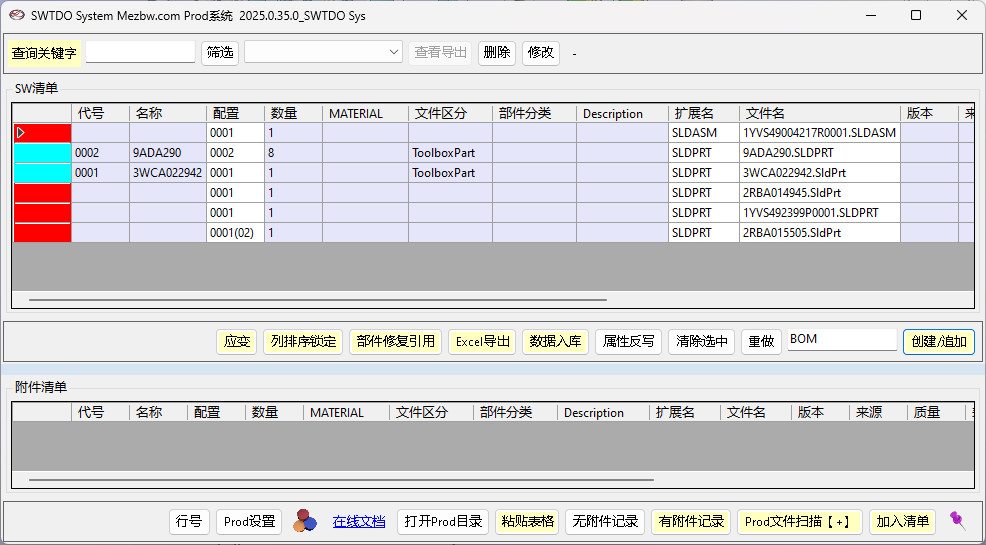
The Prod system (Prodction) is the core tool of SWTDO, and its meaning is exactly the same as that of the BOM (Bill of Materials) we generally understand.

However, compared to BOM, Prod has a significant advantage. To differentiate it from SW’s BOM, Prod is used instead.

Compare the Bill of Materials (BOM) list with SW

  1. Output various product lists, examples: machining list, injection molding list, purchased parts list.
  2. Directly export production drawings
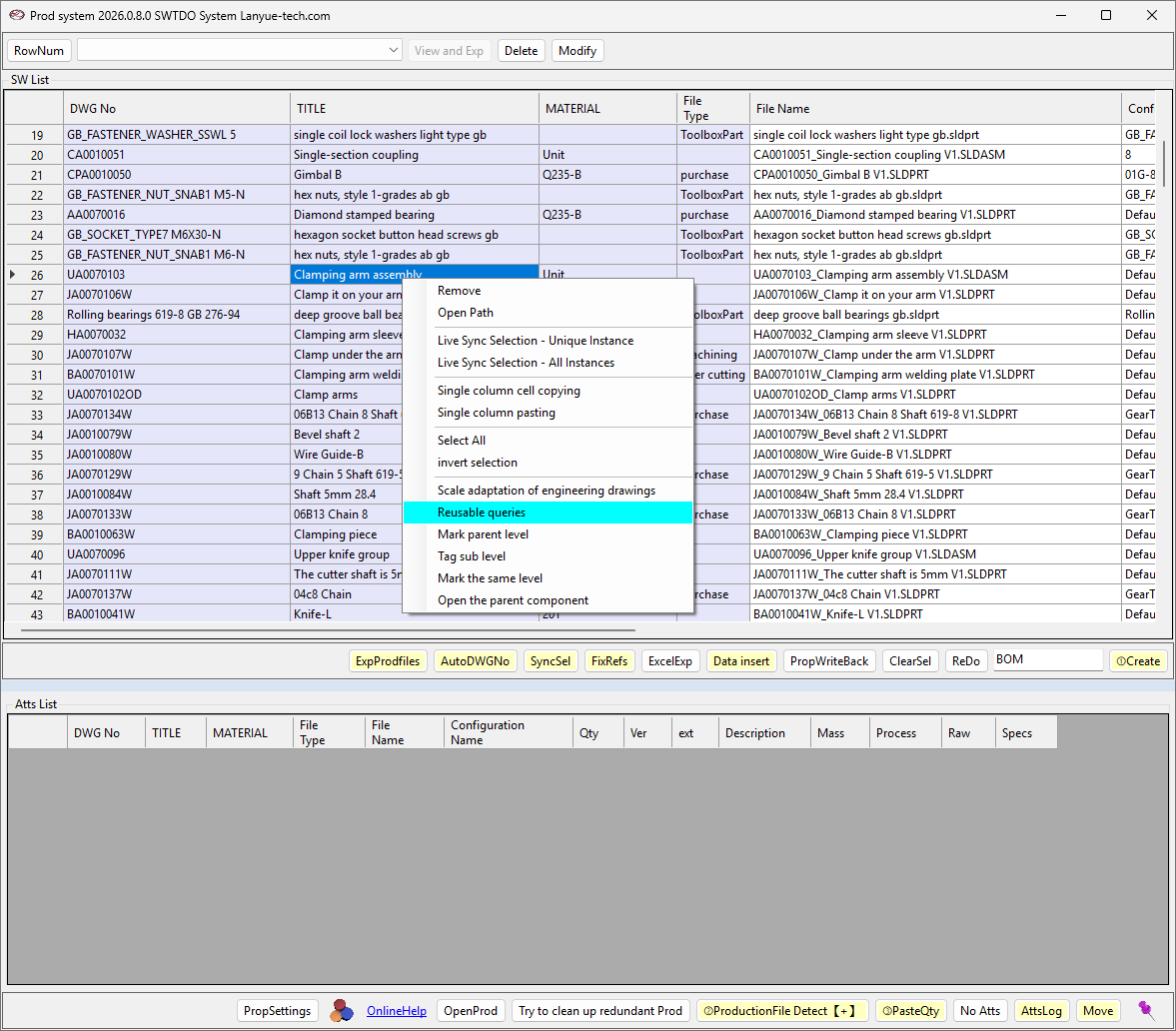
  3. [Core]: Prod’s “SW Selection” and “Strain” functions enable two-way data interaction, from part to data and from data to part. This allows for almost any other batch processing capability, enabling batch processing that incorporates the designer’s subjective intent.
  4. Prod integrates a database, ensuring that all lists are not merely confined to the creation process. Through dataset access, data exchange with the purchasing and warehousing departments can be achieved.
  5. The Prod system is not simply a BOM creation command; it is also a batch processing operation center, a data management center, an output retrieval center, an attribute batch processing predefined center, and a management center for the entire production chain, with nearly 30 different commands.

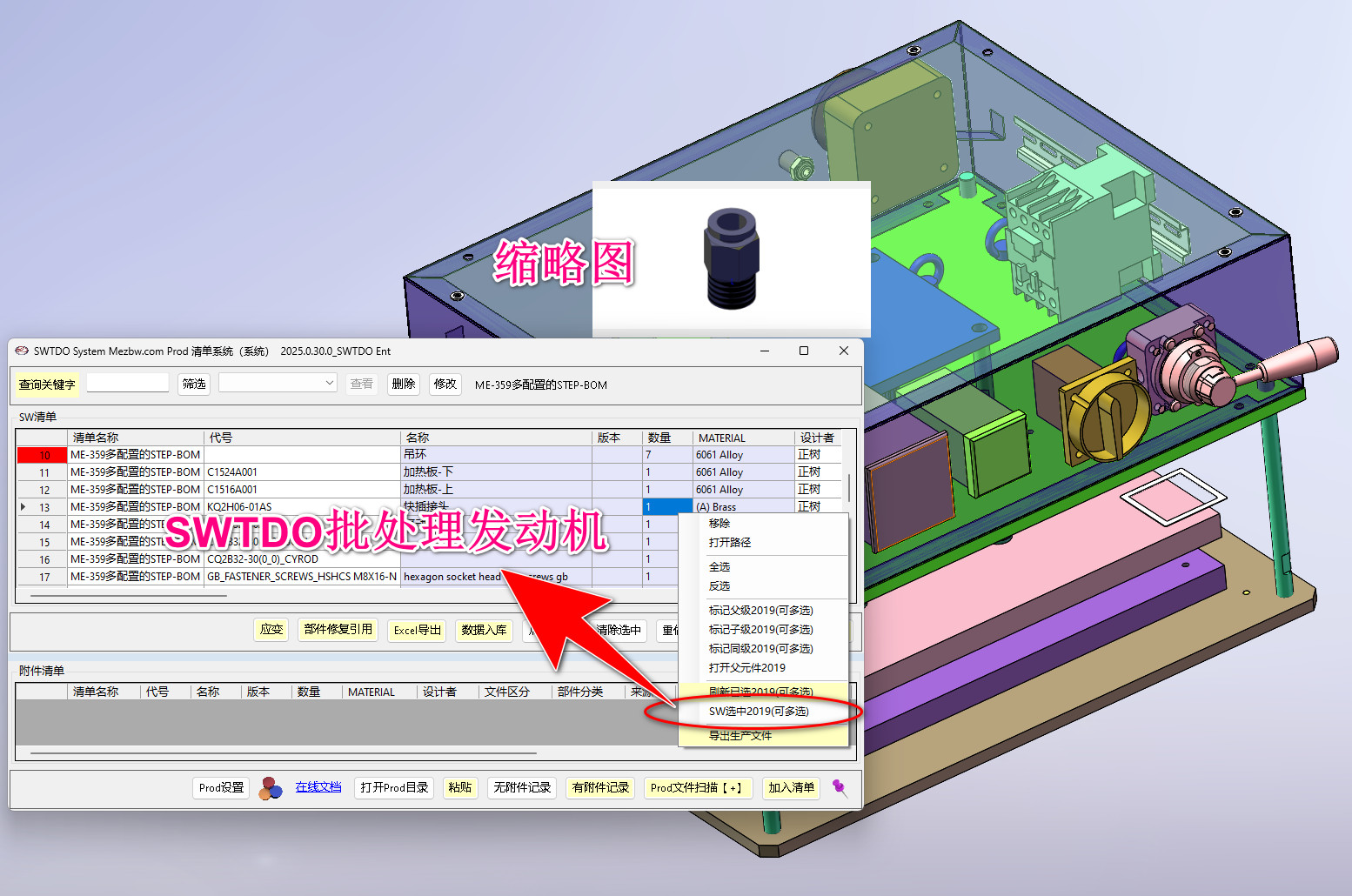
Selecting SW is the starting point for batch processing in all SWTDO tools. Since almost all commands in TDO support selecting batch processing, this selection can be used as the starting point for any batch processing tool.

First, create any Bill of Materials (BOM). In the Worksheet interface, select the part and click Strain. In the BOM, highlight the part.

It’s equivalent to a search command, but doesn’t require keyboard input.

The pink color change attribute will be written into the part’s activation configuration.

Left-click and drag the column header to the desired position; the column order will be automatically saved, including the column order in the exported Excel file.

The hierarchical relationship in the assembly is not reflected in the Prod file because:

We offer programmed output, allowing users to create a new sub-component BOM list in 10 seconds. We also support fast export and offer the option to export production files (DWG, STP, PDF, others).

The master bill of materials (BOM) is provided to the purchasing department for procurement, and the warehousing department for inventory preparation.We question whether it’s necessary for the assembly department to know the entire product list; providing only partial BOMs for sub-components would be more conducive to maintaining confidentiality.The overall Bill of Materials (BOM) is the core of the product.

Prod supports non-SW files and can create BOMs in any format, such as images, manuals, JPGs, DWGs, PDFs, etc.

In addition, Prod supports both file-based and fileless BOMs.

Target object: The component already appears in the BOM.

The component has a physical step, or a flat sheet metal unfolded drawing, or multiple configuration physical steps (all files containing a plus sign).

The data to be pasted can come from the quantity statistics under the entity list or the statistical table of the round hole statistics.

The Prod system is the central tool around which all output commands revolve. As long as our commands have output, they are all related to Prod.

The tagging command is commonly used for referencing third-party components, such as macro files generated by meter-to-meter mapping, and standard pneumatic components from S*C.

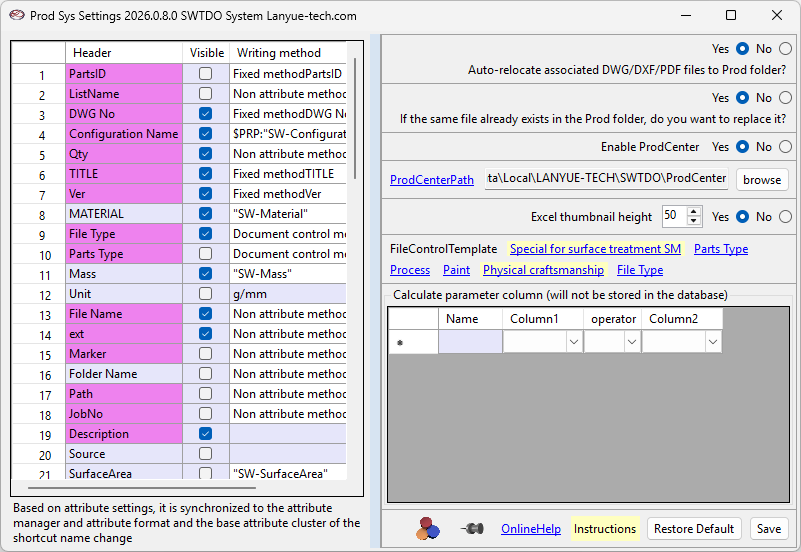
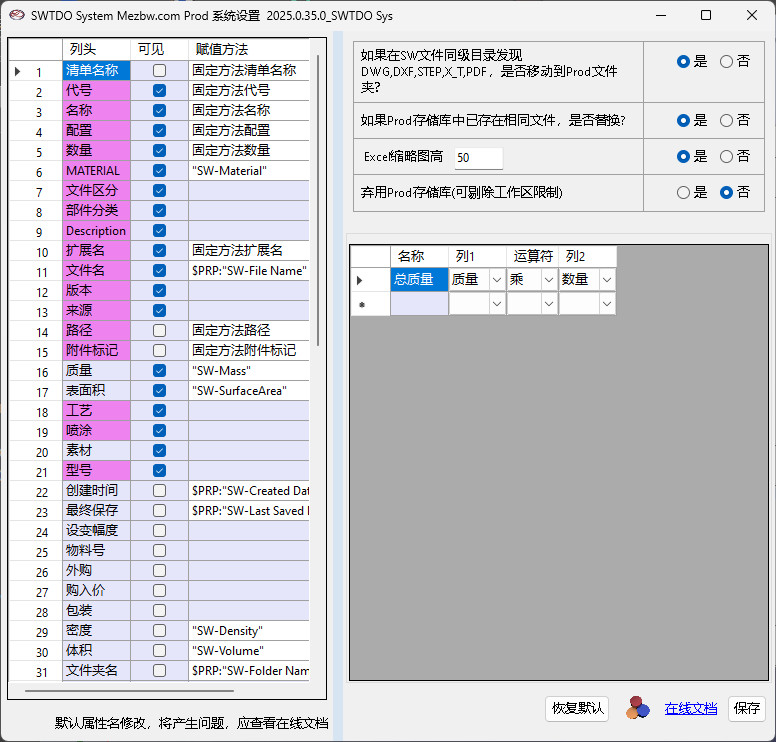
Clearing the column header disables the feature. Columns using fixed methods have specific operating procedures. For example, changing “mass” to “weight” works; changing “mass” to “density” will result in an error.

All new columns will be elements of the attribute clusters in “Attribute Formatting”, “Attribute Manager”, and “Quick Rename”.

The assignment method supports SW functions. In SW2020 and later versions, mathematical operations are also supported.

Notice:

The assignment method is the property writing method.

Prod is an attribute extraction tool.

Calculate the parameter column and extract data only from the attribute column;

Visibility only determines whether the Prod system columns are visible and has no impact on program operation, but visible columns will affect the export speed of Excel.

For example, hole counting uses specific parameters such as origin and model number. TDO contains editable but non-deletable attributes to ensure the overall software functionality.

In Prod, column sorting and display are allowed without affecting the design process.

In conclusion: activating the central treasury is entirely beneficial.

  • Prod repository: Scattered across various projects
  • Prod Central Repository: Merges and copies all files from the Prod repository into a single folder. Purpose:

    No duplicate files = Equal to the latest permanent version

  • No warnings: Assembly X, create Prod list as BOM1, containing part A
  • No warnings: Assembly X creates a Prod list as BOM1 containing part A; Assembly X creates a Prod list as BOM2 containing part A.
  • Warning: For assembly X, create a Prod list as BOM1 containing part A; for assembly Y, create a Prod list as BOM2 containing part A.

If ignored: the data for BOM1 and BOM2 of assembly X and assembly Y will all be replaced with the latest version (only for the database, not for the actual files).

Recommended action: Replace the component designation with a completely new designation (designation serialization), and replace the filename with a completely new filename. This will completely isolate the various BOM tables.

The rationale for “ignoring”

  • If you are certain that the file information for multiple assemblies is completely identical, then ignoring it is more reasonable because:
  • In 2026, a part A was upgraded. This part A was also in your 2012 project. You called the old document from 2012, but your part drawings are still the latest version from 2026.

Exporting Prod files, prerequisites

  • Your Prod folder contains files such as dwg and step;
  • The source of the file is that you created the BOM and inserted it into the database;
  • The prerequisite for receiving the goods is that you have already completed the step-by-step process.
  1. Counterexample: Perform data entry first, then generate step.
  2. Counterexample: During the viewing process, not all components were selected using the high-blue color selection feature.

Export from Prod Central Library: Available only if the Central Library is enabled in the Prod settings.

The Prod system supports the SWTDO Enterprise Edition parametric system. Once the product has completed “product presets”, Prod will automatically initiate the parametric tagging command.

In the enterprise version of Prod, all incoming parts will form the enterprise’s parts library. The detailed information of the parts library includes all attributes of all parts.

The Enterprise Parts Library is the core dataset at the lowest level for rapidly organizing all enterprise components. It supports multiple enterprise modules, such as assembly acceleration, shared libraries, and future SWTDO enterprise modules. The Parts Library is not sold as a standalone module but is enabled through the procurement of other module types.

SW Template Design Library Server Architecture

The drawing data management structure is represented by three servers plus a client.

Client: The PC used by the designer is the client.
Web Server: The server used for external network connection services, which is the support server that allows you to access company data from home. 99% of enterprises do not have this.

Key Points

Storage server:

The final location where the designer’s drawings are saved.
You can think of it as the D drive of this server, which might contain 1000 drawings, named 1.DWG, 2.DWG, etc.
The corresponding path to this drawing is…

D:\1.DWG

Typically, for security reasons, the name wouldn’t be so simple, and the file path wouldn’t be directly on the D drive. Instead, it would be named with extremely obscure or difficult-to-understand names, and even the file extension would be modified, for example…

D:\data\cache\qrcode\000\00\28\FG09023\kc\GA830009-WGC-679_easfe003.mek

A set of naming, categorization, and encryption rules is used to protect the files to the greatest extent possible. Even if someone steals them, they won’t be able to use them easily.

Data server:

It’s like a library’s front desk search system. If a user wants to use 1.DWG, the search process will translate it into the path shown above and notify the storage server of this path. Only then can the user extract the file from the extremely obscure path.

A data server can be understood as a folder on our PC. What is a folder?

It’s not like a box containing three buns; all the content is simply a large chunk of bytes piled up on a disk. The folders we see represent this translation rule. Folders tell us which data within that chunk of bytes is the data we need.

For example:

When we browse the internet, we almost always type in a domain name, such as baidu.com, which points to an IP address 39.156.66.10. The DNS server that provides the translation here performs the same translation work as the data server.

SWTDO’s Prod system is equivalent to this translation rule.

The reason we’re limiting all output files to the project folder\1.SW file\ is because we’re only targeting the project; your data must be on your hard drive to be retrieved from the folder. How can you access data on someone else’s hard drive? Here, your hard drive is equivalent to the project folder\1.SW file.

This is the concept of a workspace; only within a specific range, using relative paths, can the corresponding file be found.

Summarize:

Because you don’t have a data server or a storage server, and only have one client, you need to lock down a specific area on your computer (the workspace) specifically for untouchable storage. Our Prod system acts as the translator for this purpose.

A database isn’t a box into which you stuff your blueprints; it’s just a phone number. Only if you haven’t changed your phone number can this number find you.

SystemInt
SystemInt
GetNo
GetNo
SmartRename
SmartRename
QuickRename
QuickRename
CreateView3
CreateView3
ProdSys
ProdSys
DrawOutput
DrawOutput
DigitalModel
DigitalModel
PathBatch
PathBatch
note
note
PluginSys
PluginSys
SM Flatten
SM Flatten
BoltList
BoltList
SpeedUP
SpeedUP
SetColor
SetColor
ViewAnn
ViewAnn
Bodylist
Bodylist
Propformat
Propformat
BackUpSys
BackUpSys
DrafStandards
DrafStandards
TitleblockRep
TitleblockRep
AIAsst
AIAsst
SelfTest
SelfTest
PropManager
PropManager
CodeSerialization
CodeSerialization
HPandR
HPandR
FixRef
FixRef
OpenPath
OpenPath
QuickGetNo
QuickGetNo
DataControl
DataControl
Scroll to Top