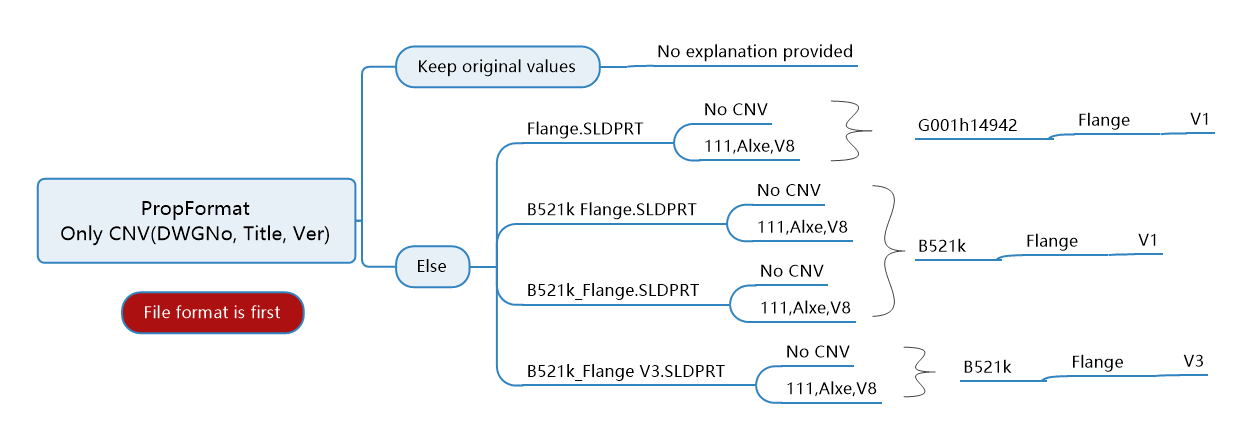
Document differentiation and avoidance: No avoidance
Attribute formatting is equivalent to directly inputting the 22 standard attributes preset by TDO into all configuration-specific attributes of the component. Attribute formatting has the same function as formatting in the Attribute Manager. However, because the Attribute Manager has path batch processing capabilities in addition to assembly batch processing, we recommend using attribute formatting as the starting point for SWTDO.
Combination Techniques
The number-issuing system determines the file differentiation format.
PropFormat + SmartRename
PropFormat + PropManager
PropFormat + sheet metal
PropFormat + welding
The relationship between PropFormat and ProdSystem settings
Sheet metal and welding are automatically recognized (with "Yes" or "No" formatted for attributes).
Enabling attribute formatting will bring up a pop-up window asking whether to keep the original attributes.
“Yes”: The speed will be very slow, and it will simultaneously extract custom attributes to the specific configuration.
“No”: Faster
For sheet metal parts and welded parts, only by selecting “No” can the system achieve self-recognition capability, and the recognition result can be directly entered into the “Document Differentiation” attribute.